


Clean your browser in 3 steps
Free to install, no account required. Premium unlocks automatic scheduling and smart profiles.
Install in seconds
Get Broom from the Chrome, Firefox, or Edge extension store. One click, no setup, no sign-in required.
Pick what to clear
Choose from cookies, cache, history, passwords, form data, downloads, and more. Full control, nothing forced.
Wipe now or schedule
Hit Wipe It for instant cleaning, or set a recurring schedule and never think about it again.
The most powerful cookie cleaner for your browser
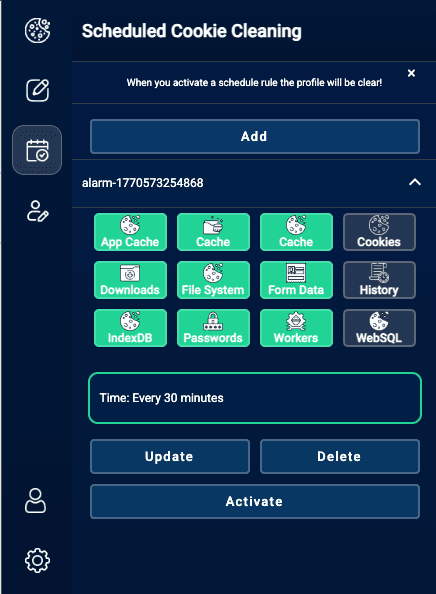
Scheduled Cookie and Browser Cleaning
Stop manually clearing your browser. Set a schedule once and Broom automatically removes cookies, cache, history, and passwords on repeat - every hour, day, or week.
- Runs automatically in the background, no clicking needed
- Choose time ranges: last hour, last day, last week, all time
- Sync schedule rules across multiple browsers
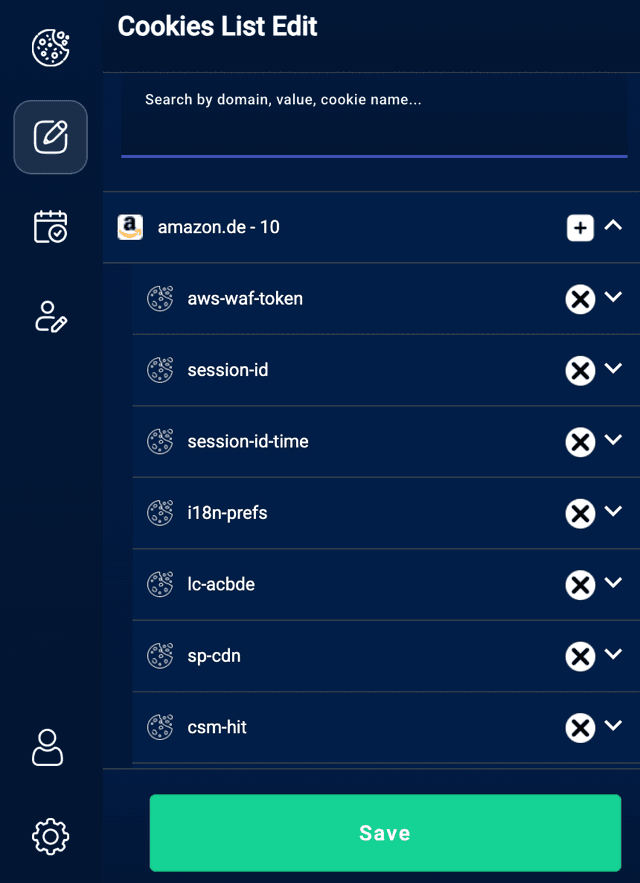
Inspect and Edit Individual Cookies
Go beyond delete all. View every cookie stored on your browser, edit values, add new ones, or remove specific trackers without breaking your logins or sessions.
- Edit any cookie without wiping your whole session
- Search and filter by domain, name, or value instantly
- Manually add cookies for development and testing
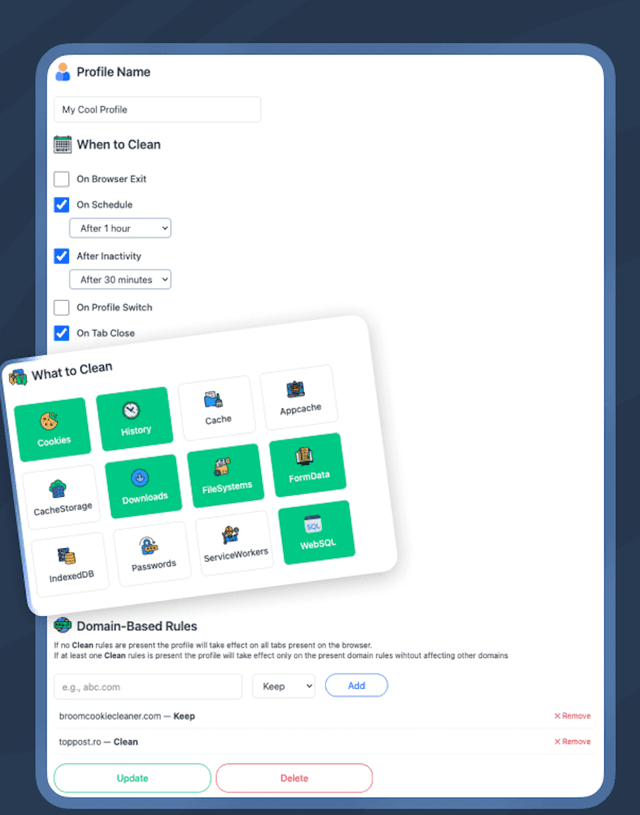
Smart Cleaning Profiles
Create dedicated profiles with their own rules, data types, and domain exceptions. Switch in one click.
- Separate profiles for work, personal and shared computers
- Domain-level rules: keep or clean per site
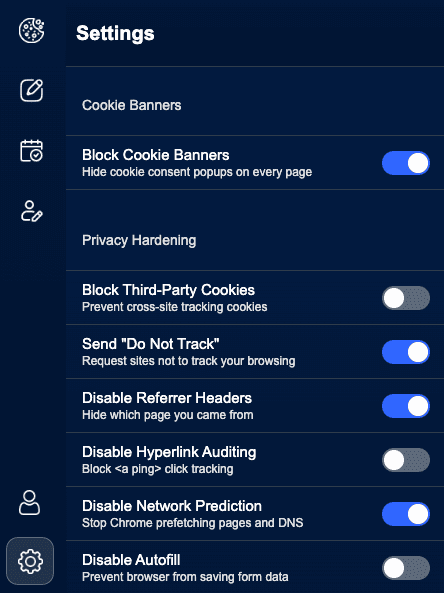
Deep Browser Privacy Controls
Block GDPR cookie banners, stop cross-site trackers, disable fingerprinting, and prevent referrer leaks.
- Auto-dismiss cookie consent popups on every site
- Block cross-site tracking, referrer leaks and hyperlink auditing
Privacy, speed, and control.
Not just another cookie deleter.
Stop Trackers Before They Build a Profile on You
Every site you visit plants tracking cookies. Over time they build a detailed picture of who you are. Broom automatically removes them before advertisers can use them.
- Remove advertising and tracking cookies automatically
- Protect sensitive data on shared or public devices
- Schedule hourly cleanups for zero-trace browsing
Your Rules, Your Browser, Your Data
Most cleaners delete everything or nothing. Broom lets you decide exactly what gets cleared, when, and for which sites - without losing saved preferences or breaking logins.
- Keep cookies for sites you trust, wipe the rest
- Fine-tune each data type independently
- Tab-specific or full-browser cleaning on demand
A Faster Browser Starts With a Cleaner One
Cache bloat and stale session data slow every page load. Broom keeps your browser lean by clearing the clutter automatically - so sites load faster and tabs crash less.
- Auto-clear cache and temporary storage on schedule
- Prevent session data from slowing page loads
- Lighter browser means snappier tabs and fewer crashes
Available on Chrome, Firefox and Edge
Free to install - direct from your browser's official extension store


People love Broom Cookie Cleaner
Thousands of users across Chrome, Firefox and Edge trust Broom to keep their browser private and fast.
“I set the schedule once and completely forgot about it. My browser stays clean automatically - cookies, cache, history, all of it. Exactly what I needed.”

“The profiles feature is a game changer. I have a strict work profile and a separate one for personal browsing. Never had this level of control over my browser before.”

“My browser is noticeably faster since I started using Broom. And I no longer see creepy ads following me around after I search for something once.”

Questions about Broom
Still have questions? Contact support